How to Take Better Selfies with a Smartphone Rear Display

Taking a great selfie is not just about having a good camera. Lighting, angles, and composition all make a difference. However, when you use your phone's rear camera for selfies, checking your framing can be difficult. A smartphone with a rear display solves this problem by letting you preview your shot while using the rear cameras.
Whether you're taking everyday portraits, group photos, or outdoor selfies, a rear display can give you more control over the final result. Here are some practical tips, along with several smartphones that make rear-camera selfies easier.
Why Use a Rear Display for Selfies?
Most smartphones have a front-facing camera for selfies, but the rear cameras may offer different capabilities, such as higher-resolution sensors or additional lenses. With a smartphone rear display, you can use those cameras while still seeing yourself on the back of the phone.
A rear display also makes composition easier. Instead of guessing where you appear in the frame, you can check your pose, adjust your position, and make sure the background looks right before taking the picture.
Smartphones with Rear Displays for Selfies
Rear displays are appearing in different types of smartphones, from flagship devices to rugged phones designed for outdoor use. Their screen sizes and features vary, so it's worth checking what each model supports.
Xiaomi Phones with Rear Displays
Xiaomi has introduced rear displays on several models, including the Xiaomi 17 Pro, Xiaomi 17 Pro Max, and the older Mi 11 Ultra. These secondary screens can help users frame selfies with the rear cameras, although the available features differ by model.
Rugged Smartphones with Rear Displays
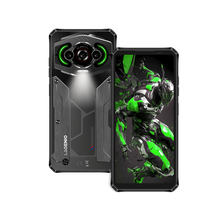
Some rugged smartphone brands have also adopted this design. For example, the DOOGEE V50 Pro features a 2.06-inch AMOLED rear display that supports rear-camera selfie previews. DOOGEE also offers models such as the S200X with a multifunction rear display.
For users who enjoy hiking, camping, and other outdoor activities, a rugged phone with a rear display combines selfie convenience with a design intended for demanding environments.
LAGENIO Panther 18 Pro: A Rugged Phone with a Rear Display
The upcoming LAGENIO Panther 18 Pro brings a rear display to a rugged smartphone designed for outdoor life. Its secondary screen lets users preview selfies while using the rear cameras, making it easier to frame portraits without relying entirely on the front-facing camera.
This feature can be especially useful when capturing travel memories, outdoor adventures, or photos with friends. Instead of taking several guesswork shots, you can check your composition and adjust your pose before pressing the shutter.
6 Tips for Taking Better Selfies with a Smartphone Rear Display
1. Choose the Right Rear Camera
Start by choosing the rear camera that best suits your shot. The main camera is often a good option for detailed portraits, while an ultrawide camera can help fit more people or scenery into the frame. However, ultrawide lenses may distort faces when the phone is held too close, so leave some distance when possible.
2. Find Your Best Angle
Hold the phone slightly above eye level if you want a flattering portrait, then tilt it gently toward your face. Avoid placing the camera too low, as this can create unflattering perspectives. Use the rear display to compare angles and find a position that looks natural.
3. Make the Most of Natural Light
Soft natural light usually produces more even skin tones and fewer harsh shadows. Try facing a window or standing in open shade outdoors. If the sun is behind you, adjust your position to avoid a dark face against a bright background.
4. Check Your Framing on the Rear Display
Before taking the photo, check more than just your face. Make sure your head is not too close to the edge, unwanted objects are not sticking out behind you, and everyone fits comfortably in a group shot. A rear display makes these small adjustments easier because you can see the composition before shooting.
5. Keep Your Phone Steady
Even a well-composed selfie can look blurry if the phone moves during capture. Hold it with both hands when possible, keep your arms stable, and use a timer if you need extra time to settle into your pose. For full-body selfies, a suitable phone stand can also help.
6. Experiment with Distance and Composition
Not every selfie needs to be a close-up. Step back to capture a half-body portrait or include more of the surrounding landscape. Try placing yourself slightly to one side rather than always in the center. The rear display helps you experiment with different compositions without repeatedly guessing what the camera sees.
How to Take Rear Camera Selfies in Different Situations
For everyday portraits, choose a simple background and soft lighting to keep the focus on your face. When taking group selfies, use a wider field of view or move the phone farther away so everyone fits comfortably in the frame.
For travel and outdoor selfies, include recognizable scenery without letting it overwhelm the subject. Rugged phones with rear displays can be particularly practical for these situations, especially when you're exploring trails, visiting scenic locations, or documenting outdoor activities.
In low light, look for a brighter nearby light source and keep the phone steady. A rear display helps you check your framing, but it cannot replace good lighting or guarantee a sharper image.
Common Mistakes to Avoid
One common mistake is holding the phone too close to your face, which can exaggerate facial features. Another is focusing entirely on your pose while ignoring distracting backgrounds or harsh shadows.
You should also clean the rear camera lenses before shooting and check the camera settings when changing between photo and video modes. Remember that the preview may not perfectly represent the final image, particularly when processing, exposure, or night mode affects the result.
What to Look for in a Smartphone Rear Display
If selfies are a priority, look for a rear display that supports live camera previews and is large enough to check your framing comfortably. Touch controls or convenient shutter options can make the experience even easier, but these features vary by model.
For outdoor use, consider the phone's durability, camera capabilities, and overall handling as well. A rear display is most useful when it works naturally with the camera system, allowing you to concentrate on the photo rather than the process.
Conclusion
Taking better selfies with a smartphone rear display comes down to a few simple habits: choose the right camera, find good lighting, keep the phone steady, and check your composition before shooting. Devices such as Xiaomi's rear-screen phones, DOOGEE's rugged models, and the upcoming LAGENIO Panther 18 Pro show how a secondary display can make rear-camera selfies more practical.
With the right technique and a phone that supports rear-screen previews, you can take more confident selfies and capture the moment the way you want.